


With the introduction of ColorOS 14, Oppo brings its own view of a modern smartphone to Android 14. Here are the three key areas the Chinese-based smartphone manufacturer has focused on with the latest update.
The Updated User Interface
ColorOS 13, the previous operating system version, introduced its aquamorphic design. This looked to simplify the cluttered user interface of earlier editions of ColorOS while bringing in more natural colors. ColorOS 14 evolves that design.
If you’re a fan of automatic Night Light on your smartphone, Oppo has extended this throughout the day. You can set the phone to tailor the spot color of the UI to change dynamically depending on your activity. It’s a nice touch that makes the phone more in tune with what is happening. Whether you want a phone that shifts with the mood is another question. I tend towards locking a phone to an almost monochrome UI that stays constant.
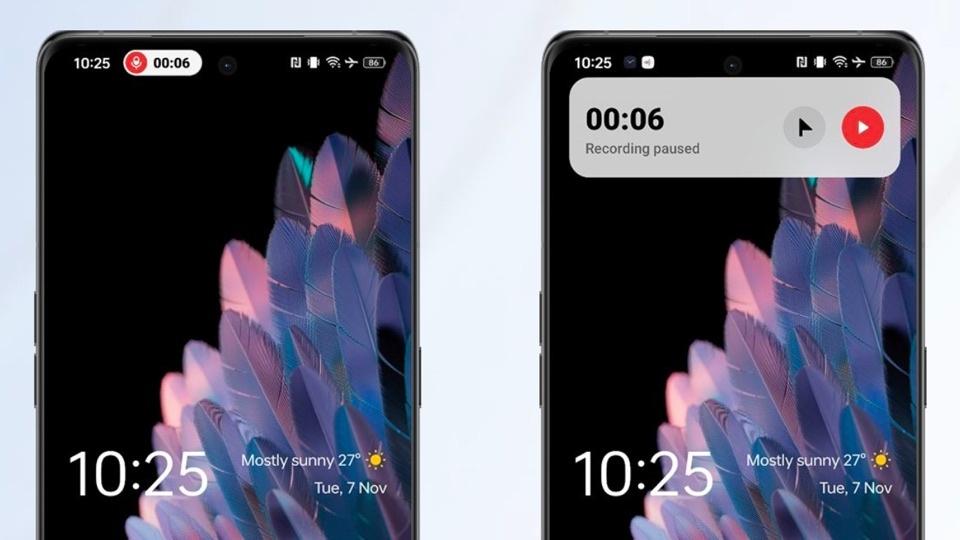
Oppo has added Aqua Dynamics into the mix. It’s a curious mix of the various docked elements that can sit on the edge of a display (such as conversation bubbles) and something that is almost, but not quite, the dynamic island from iOS. It’s not yet widely supported, and I’m curious to come back to this in a year to see if it remains as just an organisational tab or can offer more unique experiences.
The Smart Sidebar has a new feature to help share information between apps on the device and potentially through all your devices. The File Dock is a universal clipboard-esque area for storing copied information, be it text, links, or images. Not only can you recall any item up to thirty days in the future, but it is synced across your Oppo smartphones and (more importantly) tablets.
I found this useful. I’m a bit of a pack rat for information, so having a place to drop in the crumbs of information suits my style. All it needs is a long press on the highlighted info and then drag it to the sidebar. Quick and practical.
Oppo continues to highlight nature and the environment through the always-on display animations. Joining the Homeland series of ColorOS 13 is the Go Green AOD, which highlights your personal carbon footprint by taking in five different inputs (such as your step count) and offering the impact that changes in your daily patterns can achieve.
I’m not sure how much of a global impact this information can make, but it highlights personal accountability.
Time For Some AI
Given Google’s push to include AI into Android 14 and into the public consciousness, it will come as no surprise that AI also features in ColorOS 14. Oppo’s focus during the debut of ColorOS has been on AI usage in the background—no doubt AI’s impact at an application and experience level will come along when new hardware is presented.
These are wrapped up in Opo’s “Trinity Engine”, three software-based tools that keep the working environment of the phone in the best condition. You have the bizarrely titled “ROM Vitalisation” that works on your device’s storage, applying compression to less frequently used files, photos, and recordings. It also acts on apps as well. Oppo has quoted saving over 20GB of storage space during long-term smartphone use… something that can’t be effectively reviewed with a few weeks of use.
RAM vitalisation is the second. This looks at the user experience of switching between apps, launching apps and running apps in the background. AI manages the memory to offer a smooth experience based on individual priorities. Oppo’s stated gain of ten percent greater usage fluidity is tricky to measure, but running ColorOS 14 on an Oppo-supplied Find N2 Flip certainly feels smooth when moving between apps.
Finally, you have CPU optimisation, and you can likely see where this is going, using UI to balance out power, performance, and efficiency in the CPU, to maximise each area when needed. The biggest gain is going to be battery life.
Another AI-boosted feature, Smart Charging, also helps battery life. Charging patterns can be adjusted depending on user activities, and there is a manual toggle to halt charging at 80 percent to prolong battery life.
Security Tweaks
Oppo has highlighted two security features in its presentations. The first feels very much like an AI-assisted feature. Auto Pixelate works with the screenshot system to pixelate information you would not want to be published, such as friends’ avatars and names in a chat.
The other is an additional permission for apps accessing Photos and Videos; you can now set this to “Ask every time”.
Final Thoughts
These aren’t the only new elements of ColorOS. Being based on Android 14 means that all of the additional features added to the base OS are present here.
ColorOS 14 is not available everywhere immediately. The roll-out starts with Oppo’s Find N2 Flip and is expected to run through to April 2024, picking up handsets along the way. Given the last public beta of ColorOS 14 included the Find X5 series, I’d expect to see the X series next in line for the update. Also in that beta were some devices from lower down the portfolio—such as the Reno 10 Pro Plus, Reno 8 Pro, Oppo A77, and Oppo A57. No doubt, these will see the full release of the OS sooner rather than later.
I’d also expect new hardware to showcase software features not part of the OS release. While the Find N2 Flip is the first handset with access to ColorOS 14, there are no additions to the cover screen on the closed phone. Presumably, when the next generation of foldables are launched, Oppo will take that moment to showcase the new cover screen apps.
For now, we have the foundation for 2024. This is what Oppo needs to deliver a year of smartphones. The changes here lift Oppo’s operating system away from the Android base and towards offering a unique identity and Oppo’s vision of a mobile experience: one of quickly accessing information, having a phone that reacts to you during the day and delivering the right apps at the right moment.
The real test of ColorOS is when it reaches hardware.
Now read my review of Oppo’s Find N2 Flip smartphone.
Read the full article here